Posts

Showing posts with the label New skills

Problems when installing Adobe Acrobat DC using Wine (Ubuntu)

Image
It was surprisingly difficult to get this one right. I move back and forth and work between my Windows PC and my laptop with a Linux operating system. It's useful to edit files using the same software when moving across the platforms. There are software that can convert and edit PDF files such as Word or OpenOffice, however, none of them look 100% perfect after the conversion. I use Adobe Reader DC on my Windows machine to annotate and highlight texts, and it works very well. So I set out to find a way to have Adobe Reader available on my Linux machine as well. There are lots of useful websites online that shows how to do this. However, it turned out to be less straightforward and I ended up spending two days to find a way to do it. To start with I followed instructions from this website: https://linuxconfig.org/how-to-install-latest-adobe-acrobat-reader-dc-on-ubuntu-18-04-bionic-beaver-linux-with-wine 1. The first step was to download two pieces of software, Wine...
Firewall and Antivirus Software for Ubuntu

Image
I have recently started using the Ubuntu (a version of Linux, free to individuals) operating system on a laptop, instead of purchasing an additional Windows license. I have to say, since I only use the laptop for general word processing and web-browsing, it is working very well. With Firefox, Open Office, and Dropbox installed, it works just as well as my usual PC that I am more used to. I was looking for a antivirus (I was told it is not required on a Linux system, but I feel more at ease to have one) and a firewall software. Someone suggested the following software to use. If you are just starting to use a Linux system like me, may be you will find this useful. Antivirus: ClamTK You can search for and install it using the Ubuntu software finder (go to system tools > software). Firewall: UncomplicatedFirewall  This came with the operating system. Follow the instructions under "Basic Usage" here: https://wiki.ubuntu.com/UncomplicatedFirewall I have...

How to use Instagram?

Image
I have always just used Facebook and not paid Instagram much attention. More recently though, more and more individuals and businesses have asked me to follow them on Instagram. So I decided to take a look. Here is a very good guide to what it is and how to use it, if you are like me and only just starting to use Instagram, take a look at this: Overall my suspicion was correct. Instagram is very similar to Facebook.  Although the hashtag (#) function can be quite a powerful addition that is borrowed from twitter. You can add your photos to different topics or search for photos based on topics. And it might be less annoying compared to Facebook if it means you can share your best moments with friends and families without lots of ads and filtered news targeted at you.

Samsung S7 not recognised by computer

Image
For some reason my phone would not connect to one particular laptop but would connect without any issues to other computers. If you have the same problem then try the steps below to see if it works for you as well. 1. First I tried to install the USB driver on the computer. You can download the driver here: https://developer.samsung.com/galaxy/others/android-usb-driver-for-windows Still did not connect. 2. Tried to install SmartSwitch which is a Samsung software for managing and transferring files from your phone. You can download this from here: https://www.samsung.com/us/support/owners/app/smart-switch Still nothing happened. 3. Restart the computer . This is a very important step. You should get a message whether you want to allow the PC to access your phone once you rebooted the computer. Hope this works for you as well. If this didn't work, check some of these additional settings:

How to join up words in excel

Image
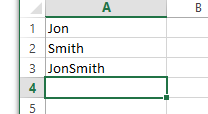
I have a slight suspicion that I have written a similar post about this before. But since I could not remember how to carry out this particular task myself without looking it up, I ought to write it into my learning diary again. To join up two words that are in different cells in Excel, what you do is something similar to this. For example. The word Jon is in cell A1 and the word Smith is in cell A2. To join them and enter into A3 you go to cell A3 and type: =A1&A2 The & sign links the words together. However, you will notice that there is no gap between the words. To add a single space, you need to add something in-between. To insert any text in between, you need to use " " around them. So to add a space in between Jon and Smith you need to add a single space as text. So the formulae should be: =A1&" "&A2 This should give you the correct result.

Using High Contrast Mode on Firefox, Accessibility

Image
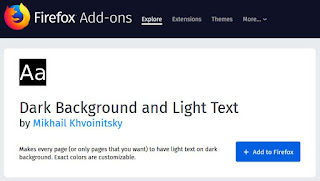
I read on computer screens for at least 8-9 hours a day. The bright white/blue light from the screens can make my eyes tire easily so I use high contrast mode whenever possible. On a Windows computer you can switch between the default view to High Contrast Mode by pressing Alt + Shift + PrintScreen. However, this will turn everything on the computer high contrast which may not be what you want. I use Firefox and Chrome for web browsing. Both of them have high contrast add-ons that you can enable to easily switch to high contrast mode. For Firefox, find the add-on here: https://addons.mozilla.org/en-GB/firefox/addon/dark-background-light-text/ After you have added the add-on, a new icon should appear on the top right corner. You can now switch between the different views by simply clicking the icon. It looks like this: There is a similar add-on on Chrome, you can get it here if you are using Chrome as your browser: https://chrome.google.com/webstore/detail/high-c...

AdSense taking a long time to setup

Image
Not sure how many of you have tried to include Google's AdSense onto your blogs or websites. Most instructions online said it would normally take about 1 day to activate. After applying, my blog was accepted to allow AdSense widgets. However, when I log on to AdSense, I always get the same page saying "We are working on setting you up".  It has been almost a week now. I have tried to leave a feedback but no response from AdSense so far. Not sure why it's taking so long. Without access to the background settings, I can't really use AdSense to display the appropriate ad contents. My hope is that once AdSense is setup, relevant amazon links will be available on the page automatically depending on the subject matter, without me having to insert the relevant links to the posts. Anyone else had a similar experience? How long did it take you to set up AdSense?

Ubuntu dual-boot setup, choose Windows as default

Image
I have recently installed Ubuntu as an alternative Operating System onto my PC. Ubuntu is a version of the free Linux operating system, I thought it was about time for me to try it. However, I do wish to keep my Windows stuff unchanged, hence I went for the dual-boot option. The installation was actually very easy. - First I downloaded Ubuntu for Windows here: http://www.ubuntu.com/download/desktop - Then created a installer on a USB stick with these instructions http://www.ubuntu.com/download/desktop/create-a-usb-stick-on-windows - Restarted the computer, and chose to boot from USB at Setup. And everything worked perfectly. However, the PC will now choose to start Ubuntu by default  if you don't choose Windows at restart (on mine it's the third option down), but I actually wanted Windows as the deafult boot option. Luckily this was not diffuclt to change: - Click on the Ubuntu icon, in the searchbar type Terminal. - Click Terminal to bring up...

Brainstorming Tool - FreeMind

Image
Today I want to quickly share with you one very useful brainstorming software that I have come across recently. It is extremely handy for organizing and planning tasks, making notes, exploring ideas and brainstorming in a very visual way. Here is one brilliant tutorial to get you started: I find it quite useful for summarizing books that I have read, helping me to memorize new ideas. It is completely free. So download one and have a go.    

Buying US Shares from the UK

Image
Have you ever thought about owning shares of those mighty US corporate giants, such as Microsoft, Cisco, or Apple and benefit from their global success? (well, provided that you get them at a good price..). If you are British and live in the UK, it is actually quite easy to do. Simply call your stock broker and ask to activate your dealing account for US trading. You will be asked to fill in an Individual Investor declaration form which takes about 10 minutes (asking questions such as status of employment, do you trade professionally or for a company...etc.). The form is renewed annually to keep the record up-to-date.  And.. that is it really, you are ready to go. Bear in mind that there are also currency exchange and tax considerations to think about. As a foreign person, your stock broker can also provide you with a Form W-8BEN , to reduce the amount of withholding tax that you are required to pay if you receive any dividends. Here are more advices from the Tel...

Eyes, Eyesight, Vision

Image
If you do some searches online and read on the subject of vision correction, you will soon find that other than the mainstream lens prescriptions, Specsavers. contact lenses, laser eye surgeries, there is another group of people that believe the eyes can be trained to 'correct' vision. And it's not a recent theory either, the methods promoted by Dr. Bates has been around for more than 100 years.  Based on personal experience, the theory seems intuitive. The habitual incorrect use of the eyes can lead to poorer vision over time (i.e. still trying to see when the eyes are tired). When this happens, we usually get glasses to try and compensate for the incorrect focus. However, in doing so the eyes accepted this new poorer vision as the 'normal' state and therefore are not exercised or challenged to even try and restore to its previous state. From that point, the vision can only get worse if the habitual incorrect use of the eyes persist. The system therefo...

Which Programming Language Should I Learn?

Image
I have been following an online course lately. A bunch of different programming languages were thrown in as part of the syllabus. However, after completing about 1/3 of the course, I can't help but wonder if I should invest more time perfecting these languages, or if those were merely taught to demonstrate the concepts and ideas. So which programming languages should you learn? Among others, website Dev/Code/Hack suggests a different question - what is the problem that you are trying to solve? In other words, your intended application. The popular languages today are: Ruby, Python, PHP, Objective-C, HTML, CSS, JavaScript, Java, .Net, C/C++. Oh, they even included handy summary tables of what each of the languages are typically used for - very useful. Personally I don't know enough about the industry to comment on which language specialists tend to be higher earners, but author of the blog seems to suggest: Python, Objective-C, JavaScript, HTML, CSS. You'll a...

Fun Code School!

Image
I was introduced to Git recently.  Git is a repository software that people use in the Unix/Linux environment to keep track of file versions as they work on those files. (very handy for recovering files, I wish I knew Git when I was writing my thesis back in school) I did some quick search online. There are numerous resources introducing Git and its capabilities. One of those sites stood out in particular- called tryGit by Code School . Code School teaches you how to program by using interactive and fun examples. all self contained within the web browser and does not require you to install any additional software. This learning by doing approach is very effective. In 15 minutes, I was able to go through the basic Git functions and felt ready to use it right away. And it felt like playing a game!

Understanding Empathy

Image
I wonder why this wasn't taught at school, because it's such an important skill and yet very few possess this ability or know what it is exactly. How to show support and be empathetic towards someone that is going through a difficult time? Next time, try to be supportive in the right way or you may be causing more harm than good and not realising it.

Earth Wind Map by Supercomputers

Image
Randomly came across some stunning images of the Earth's wind and ocean on this blog .  Looks like there is quite a lot of wind hitting the UK! The interactive visualization of wind patterns all around the world is created by a computer program that downloads weather data from the Global Forecast System at the National Centers for Environmental Prediction, part of NOAA/the National Weather Service. This raw data is then rendered in your browser in the form of a globe that can be moved (drag with the mouse) and zoomed in and out of (use your mouse scroll wheel). The data is updated every 3 hours, so it is pretty close to real-time considering that this isn't just a small local dataset but covers the whole planet. I wonder what the poles look like: Amazing! That is a lot of activities! These images are just beautiful. You can play with it and look for your region on here . Just one more image: Looks like it's going to be windy, I better ta...

Differences between an Antelope and a Deer?

Image
To be honest, I have no idea what an antelope is, as I have never seen one (which is why I decided to do a little search and document it here). According to Differn.com the main differences between an antelope and a deer are: The most prominent difference between antelopes and deer is that male deer have antlers which they shed and grow every year while antelopes have horns that are permanent.  Another difference is that deer antlers are branched and antelope horns are not. Antelopes belong to family Bovidae (as do sheep, goat and cattle), while deer belong to family Cervidae. Both are even-toed ungulates (hoofed animals) and ruminant mammals. Learning something new everyday :)

Switching Android Input Language on a Bluetooth Keyboard

Image
This happened to me just as I was about to finish the previous post. I accidentally switched the input language when typing on my Bluetooth Keyboard. There was no obvious ways of switching the input mode back without going into settings and Ctrl +Shift or Alt and all those possible combinations did not seem to work as in Windows. It took me a while but I found the solution. If you are using an Apple Bluetooth Keyboard on an Android device like me, you can try pressing Space + Shift simultaneously to switch the input language.   I hope this will prevent some of you out there from having the same problem. Let me know if it works for you! Recommended Book

Best Office App for Android (in my opinion)

Image
I have been looking around for a good App that would allow me to read and edit my Excel/ Word files...etc. There are quite a few out there to choose from including Apps provided by Microsoft or Google. Surprisingly, I found that quite a few of these Apps can't actually read Excel Tables. The best one I found was Kingsoft's WPS (red one above) which seems to provide all the functions I need including editing Excel files and can open quite a lot of different documents without problems.  The Apps provided by Google or Microsoft were a little disappointing. Hopefully they will improve in future updates. For now, I will recommend Kingsoft.

Is it safe to sell your old computer?

Image
You want to sell your computer or tablets. You wiped your data from your hard drive for extra security. That should be enough right? Well, according to some reports, it seems like deleting your personal data forever completely and thoroughly is almost impossible. Here are some of the bad news: 1. "normal deletion of files in your operating system of choice really only purges their respective file references. In the interest of performance, the actual data is left untouched on the drive -- with the space it occupies marked as empty." 2. "there are techniques and equipment that can recover data from hard drives that has been "wiped" over with zeroes or random bits." 3. " Techniques such as Magnetic force microsopy (MFM) make truly deleting data from magnetic media extremely difficult mainly because of the inability of the hard disk write head to write in the exact same location along the magnetic track." 4. "Contrary to...

DISQUS - let people talk (comment) on your site

Image
Came across this interesting looking video by chance. DISQUS is a commenting system that people can add to their websites to quickly allow viewers to comment and interact on shared topics and interests. I think it's rather clever. And I agree with the fact that although friends are great, they don't always share all the same intesrests as you, which is perhaps one of facebook's weakness (not to mention all the strangers that you added out of politeness in the first place!). DISQUS lets people that are searching for the same topics and websites to discuss and interact. Are your friends a bunch of (adorable) monkeys sometimes?  Look out for DISQUS on websites and join that interesting topic or intellectual discussion with (hopefully friendly) strangers.