Posts

Showing posts with the label how to..

How to Fix PS5 Pro Lag/Stutter Issue

Image
After a recent patch update, my PS5 started acting strangely, with increasingly noticeable lag issues while editing videos in Share Factory. I also noticed that some games weren’t running as smoothly as before. After doing some digging, I came across a helpful Reddit thread where others reported similar problems. One popular suggestion was to do a power cycle, which slightly improved things- but the issue still lingered. Eventually, I tried a method using Safe Mode, and to my surprise, it actually fixed the problem. I have not noticed any lagging issues since. If you're facing similar issues, this might help you too. Here’s what to do: 1. Force shut down your PS5 by holding the power button until the console turns off—don’t use the controller or go through the standard shutdown process. 2. Turn the console back on. It should boot into Safe Mode , informing you that the system wasn’t shut down properly. It will attempt to scan and fix any system errors- which, ironically, seems to...

How to Resolve the Annoying "UPLOAD BLOCKED We couldn't verify you have the necessary permissions" One Drive Problem

Image
This is an incredibly frustrating and annoying issue, especially when the files are your own and OneDrive refuses to sync them- I hear you.  If you're encountering the "UPLOAD BLOCKED: We couldn't verify you have the necessary permissions" error while syncing files with OneDrive, here's a step-by-step guide to resolve it. Check File Permissions: Go to the OneDrive web interface (onedrive.live.com). Navigate to the folder where you are encountering this issue. Right-click on the file in question and select "More actions" or "Manage access." Ensure that you have the necessary permissions to access and edit the file. You should be the owner or have at least "Edit" permissions. Once you have made these changes, the files should start to upload and sync. It took me a while to find this solution, so I hope this post saves many of you a lot of time. ********* If you're planning a trip abroad soon, protect your personal information onli...

How to fix iD Mobile (UK) Slow 4G/5G Speed Issue

Image
I recently got a new phone contract and switched to iD Mobile. Immediately, I noticed that the internet speed was much slower than my previous network. However, I found a fix online that resolved the problem. Hopefully, this will help some of you as well. Go to Settings > Network > Internet Set Private DNS > Off Restart the Phone.  Many thanks to this person for providing this solution ! ********* If you're planning a trip abroad soon, protect your personal information online by using a VPN service before connecting to public WiFi networks. This will also allow you to watch Netflix or use internet banking just like at home.  Get 63% off your VPN  cost today for less than £3/$5 a month.

How To Fix the OBS Recording "Too Dark" Problem

Image
I am surprised by how challenging it was to find a solution for such a simple flaw. While the latest version of OBS is highly versatile and allows advanced users to adjust numerous options to achieve the best output, for those like myself who simply want to record their screen as they see it, whether for meetings or gaming, OBS could benefit from incorporating a few standard settings so that most users do not need to excessively tweak the configuration. To give you an idea of the problem, before making any adjustments, my recordings appeared like this. As you can see, this is significantly darker than how my screen appears, which is undesirable. There are numerous posts suggesting setting the color range to partial, among other recommendations, but none of them worked for me until I randomly stumbled upon a solution. Here are the steps: Double-click on your source, in my case, a Display Capture. A properties menu will open. Click on "Force SDR." You will immediately notice th...

How to Achieve a Less Stressful Life

Image
Freedom to Choose and a Less Stressful Life I  decided to write a random piece that probably no one would understand, just for a bit of fun. If you are interested in what it says, use an AI to do some translation. Hopefully that some of you would find it useful. Dear Reader, It's with great delight I see you pondering life's grandeur and happenstance, stumbling upon this humble journal of musings. Though I don't know your face, I do hope that more young souls will embark upon the noble quest for financial independence. For in such endeavors lies the bedrock of societal stability, prosperity, and the alleviation of worldly burdens. And if perhaps you are of elder years yet still within the yoke of toil, fret not, for the path to financial independence welcomes all. What follows here be not counsel of finance, but rather reflections from my own journey. Let each heed befitting their own station in life. The Importance of Passive Income Much of the wisdom shared herein resonat...

Comment Section Missing on Blogger Blog

Image
I noticed yesterday that since changing the background theme template of my blog, readers are no longer able to comment on my blog posts as the comment section was missing. This problem took me a while to solve, even though the solution is quite simple. I checked online for answers, and they all give the same instructions. This is the typical instruction Google gives: Unfortunately, these instructions from Google miss a critical step and it can take a long time to figure out if you have not encountered this before. Hopefully, this post will save a lot of you a lot of time so you don't have to struggle like I did. In addition to the steps above, a key step is to go to Settings in Blogger, click on Layout, and edit the 'Blog Posts' settings. Then scroll down to the 'Show comment count' section and enable it. Hopefully, now if you go to a blog post, you should see the comment section allowing readers to leave comments. I hope you have found this useful. ********* Monda...

Simple Trick to Make Your Website Links Open in a New Tab

Image
 If you take a look at the left-hand side of my blog, you'll find some highly recommended book links that will redirect you to external websites like Amazon or eBay. To ensure a smooth user experience, I have used the following method that will allow these links to open in a separate tab when clicked. The HTML code for embedding an external link typically appears like this. To have the linked page open in a new tab, merely add  target="_blank  right after the website address enclosed in quotes. Simple as that!

How to create hyperlink that jump to a specific section of your web page

Image
What is A Jump Link A jump link is a link that 'jumps' to a specific section of a page on your website. How is A Jump Link Useful Anchor links or jump links are extremely useful in guiding users through long pages. By creating a table of contents at the top of your page with anchor links that link to different sections of your blog post, readers can easily find the exact information they need. This not only makes your page look more professional but also helps readers find the information they need faster. Additionally, providing a better user experience for your readers could potentially increase your website's authority as more people find it easy and convenient to use. How to create a Jump link To create a jump link, assign an object name to the section of the page you want to jump to, such as OBJECT_NAME. Then, view the HTML of your web page and add the following HTML code to the start of that section, just before the beginning of a paragraph or other content. <a id=...

Use Android Apps on PCs (BlueStacks)

Image
I stumbled upon a nifty solution while searching for ways to upload and organize my photos on Instagram directly from my PC. BlueStacks is an Android emulator that lets you install and use apps from the Google Play Store on your desktop, including Instagram. With BlueStacks, I can download Instagram like any other Android app and run it on my Windows laptop as if I was on a smartphone. But doing so opens up handy options like uploading photos from my filesystem and managing my profile on a big screen. Discovering BlueStacks gave me the ability to access Instagram on a PC with a few simple clicks. Installing BlueStacks: Downloading and installing BlueStacks is quick and easy. First, go to the BlueStacks website here   and click the download button. Be sure to select the version of BlueStacks for your Windows or Mac operating system. Once the download is complete, open the BlueStacks installer and follow the on-screen setup prompts. The installer will guide you through any additional...

How to Upload Photos from PC to Instagram

Image
Instagram is one of the most popular social media platforms for sharing photos and videos with your friends and followers. However, if you want to upload photos from your PC to Instagram, you might encounter some difficulties. Unlike the mobile app, the web version of Instagram does not have a direct option to upload photos from your PC. Fortunately, there are some workarounds that can help you post photos from your PC to Instagram without using any third-party software. In this blog post, I will show you two methods to upload photos from your PC to Instagram using your browser.   Method 1: Use the Developer Tools in Chrome or Firefox One of the easiest ways to upload photos from your PC to Instagram is to use the developer tools in Chrome or Firefox browsers. These tools allow you to simulate the mobile version of Instagram on your PC and access the upload option. Here are the steps to follow: Open Chrome or Firefox browser on your PC and go to https://www.instagram.com/. Log in t...

The ONLY Link You Will Ever Need: Linktree

Image
Are you looking for a way to share your links across multiple platforms? Look no further than Linktree! Linktree is the original and most popular link in bio tool, used by over 30 million creators monetizing and doing business around the world. Linktree allows you to create a single page with all of your links, making it easier for people to find what they're looking for. You can add your unique Linktree URL to all the platforms and places you find your audience, such as Instagram, TikTok, Twitter and other bios. This makes it easier for people to find what they’re looking for without having to search through multiple posts or profiles.      Linktree also has an app available on both Google Play and App Store. With this app, you can easily manage all of your links from one place. You can customize the look and feel of your page with different colors and fonts, as well as track analytics on how many clicks each link gets. Plus, you can even add custom images or videos to m...

How to Add and Verify Blogger on Google Search Console

Image
 Here are the most straightforward instructions to get this to work. Watch this video. I got this done within 5 minutes.  ********* Do you use wifi in public places or travel abroad often? Do you worry about cyber security? Get added security with a reliable VPN.   Get a reliable VPN  today for less than £3/$5 a month. 

SEO Optimization for Bloggers and Content Creators

Image
What is SEO and why it's important for bloggers and content creators SEO stands for Search Engine Optimization. It is the practice of optimizing your website or content to rank higher in search engine results pages (SERPs) for relevant keywords. This increases the visibility of your content and drives more traffic to your website. For bloggers and content creators, SEO is crucial because it helps your content get discovered by your target audience. Without SEO, your content may get lost in the vast sea of online content, making it difficult for your target audience to find you. Therefore, implementing SEO techniques can help boost your online presence and increase the visibility of your content. This guide is divided into several sections, each covering different aspects of SEO, and by the end of the guide, you will have a clear understanding of how to improve your website's visibility and discoverability by search engines.  Click here to head over to my business blog to read t...

How to fix incorrect time display on Windows 11

Image
Here are the steps to fix the issue of incorrect time display on Windows 11: Open "Settings" and go to "Time & Language". Make sure the correct time zone is selected. Turn on the toggle switch for "Set time automatically". Click on "Sync now" to synchronize your computer with the internet time server. Once you have completed these steps, it may take up to 10 seconds for the system clock to update. If the time still appears incorrect after the first attempt, try clicking the "Sync now" button again. This should resolve the issue and ensure your computer displays the correct time.

How to remove Tiktok watermark from Tiktok videos

Image
TikTok has taken the world by storm, with millions of users creating and sharing videos on the platform daily. However, while the app is known for its creative and fun content, many users also want to share their videos on other platforms without the watermark. Removing the TikTok watermark from videos is quite simple to do. This blog post will show you how to remove TikTok watermarks from your videos using a simple method and add more features to your videos. Step 1: Follow the instruction here to  download your video from Tiktok ; the downloaded video should have the watermark removed already.  Step 2: Now, to add more features and text to your video before sharing, head over to create  a free account on Canva . Canva allows users to edit videos for sharing on different platforms. ********* Do you use wifi in public places or travel abroad often? Do you worry about cyber security? Get added security with a reliable VPN.   Get a reliable VPN  today for les...

How to download videos from Tiktok

Image
Downloading TikTok videos is a breeze! First, select any video you'd like to download and copy its link from the page.  Next, navigate to https://savett.cc/ and past the link into the designated field. Finally, select the MP4 format and hit download. Voila! Your video will be saved to your device in no time. Make sure to give credit to the original creator when promoting someone else's content. Doing so demonstrates respect and encourages a culture of integrity and creativity. Want to save time and write reports or emails more effectively?  Try Jasper writing assistant today for free  with my link.

How to redirect a single blog post to external URL

Image
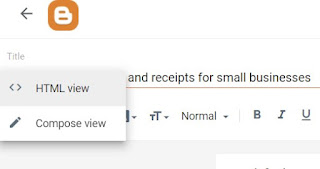
If you're looking to redirect website traffic from an outdated blog post to a new, external web address- such as a new blog- there's no need to fret, as the process is quick and straightforward. Go to  the old blog post > click to edit > change into HTML view > and paste the following code at the bottom  (changing the web address to your own). And you are done.  <script> window.location = "https://your external web site address here.com"; </script> ********* Do you use wifi in public places or travel abroad often? Do you worry about cyber security? Get added security with a reliable VPN.   Get a reliable VPN  today for less than £3/$5 a month. 

How to type a back slash (\) on the keyboard?

Image
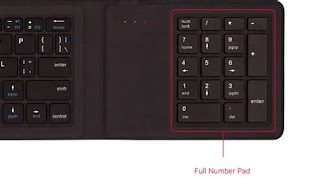
I can relate to your frustration when you see the symbol on your keyboard, but your computer just won't type the  \  character, no matter what you do. I've been there too, and I know how exhaustive it can be to look for different solutions online. So to help make things easier for you, I have a possible solution that worked for me in the past. Try this: Hold down the  Alt  key on your keyboard. While still holding the  Alt  key, press  9  on the number pad on your keyboard. Then, while still holding the  Alt  key, press  2  on the number pad on your keyboard. This should type the  \  character onto your document. Hopefully, this solution will work for you too. This is mainly for people that are using a keyboard on a PC. If you are using a laptop then you shouldn't have the same issue. \ Are you curious about all the hype about AI?  Try Jasper writing assistant today for free .

How to find out which version of DrectX your computer has?

Image
Some PC games these days require DirectX 12 to run correctly. It is another reason that I upgraded my PC to Windows 10. Unfortunately, Windows 7 and 8.1 only include DirectX 11.  To see which version of DirectX you have in Windows 10. Press  Windows key + R . And type  dxdiag . The tool should tell you which version you have.   ********* Do you use wifi in public places or travel abroad often? Do you worry about cyber security? Get added security with a reliable VPN.   Get a reliable VPN  today for less than £3/$5 a month.